
Hide seller posts · blacklist
Hide posts from NextCore VIP sellers and blacklisted accounts in the news feed, groups and comments inside a profile, so only posts from customers looking for rooms remain.
When you browse travel groups looking for customers, you have to scroll past dozens of room offers from other sellers. Ẩn bài seller · blacklist (Hide seller posts · blacklist) attaches a filter to the profile: posts from NextCore VIP sellers and from accounts on the blacklist are hidden in the news feed, groups and comments. Posts from customers looking for rooms still show.
The app filters inside the profile itself, no extension to install. The feature is for seller accounts or the VIP plan, and only runs on NextCore Chromium profiles (Firefox is not supported yet).
Where to open it
Sidebar › NEXTCORE AUTOMATIONS › the Ẩn bài seller · blacklist (Hide seller posts · blacklist) row › Open. In the library, this row shows the number of profiles filtering and the number of accounts on the blacklist.
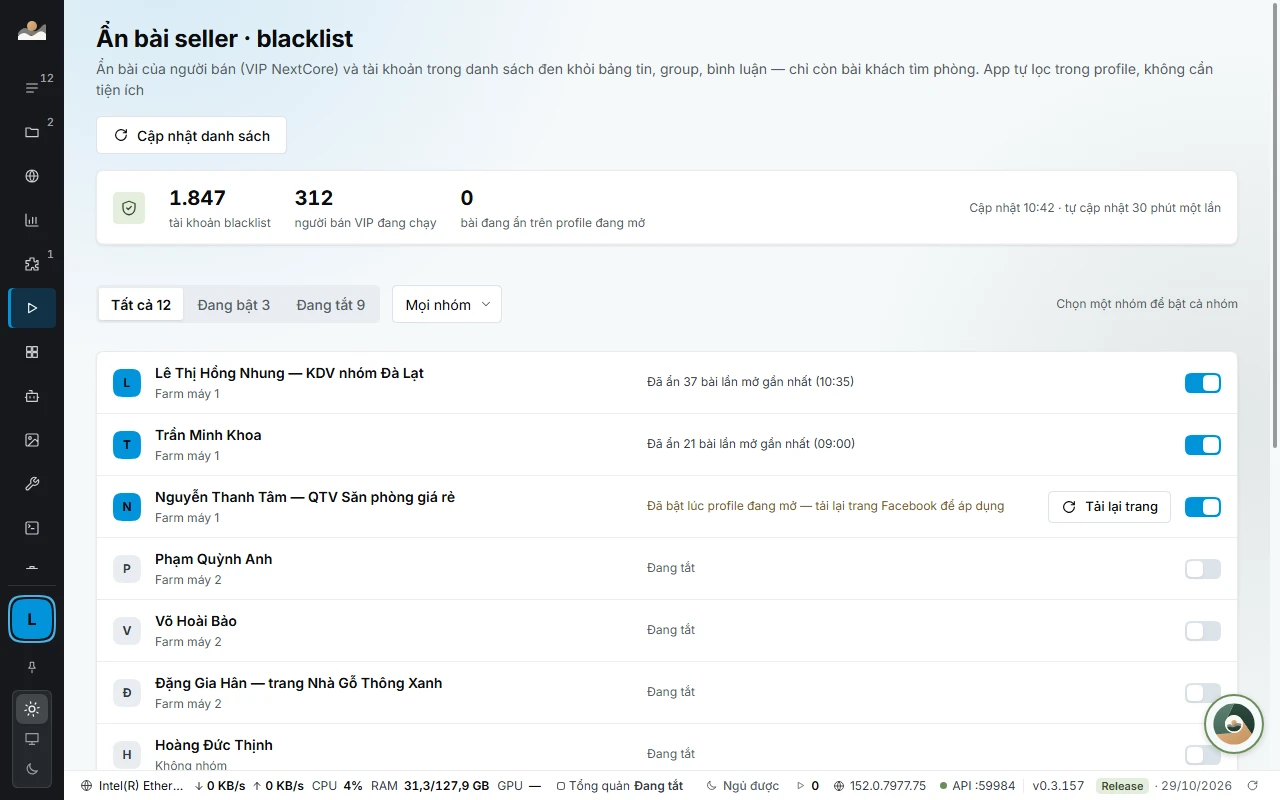
Reading the screen
The three numbers at the top of the screen:
- tài khoản blacklist (blacklisted accounts): the number of accounts on the blacklist.
- người bán VIP đang chạy (active VIP sellers): the number of NextCore VIP sellers currently hidden.
- bài đang ẩn trên profile đang mở (posts hidden on open profiles).
The line below shows when the list was last updated. The list updates itself every 30 minutes; click Cập nhật danh sách (Update list) at the top of the screen to fetch it now.
Turn on filtering for profiles
One profile at a time: turn on the switch at the end of the profile row.
A whole profile group:
- Choose the group in the Group box.
- Click the Bật N profile … (Turn on N profiles …) button with the group name, for example Bật 12 profile Đà Lạt (Turn on 12 profiles Đà Lạt). Click Tắt cả nhóm (Turn off whole group) to turn it off.
The Tất cả · Đang bật · Đang tắt (All · On · Off) filter bar shows at a glance which profiles are filtering.
Each profile row shows a status:
| Row says | Meaning |
|---|---|
| «Đang bật · lọc khi mở profile» (On · filters when the profile opens) | Turned on, the profile is closed |
| «Đã ẩn 23 bài lần mở gần nhất (14:05)» (Hid 23 posts the last time it was open (14:05)) | Posts hidden the previous time it was open |
| «Đang mở · trang hiện tại đã ẩn 41 bài, 6 bình luận» (Open · the current page has hidden 41 posts, 6 comments) | The profile is open, with a Đang lọc (Filtering) chip |
| «Đã bật lúc profile đang mở…» (Turned on while the profile was open…) | The Facebook page needs a reload; has a Tải lại trang (Reload page) button |
| «Profile dùng Firefox…» (Profile uses Firefox…) | A Không hỗ trợ (Not supported) chip |
Turning it on or off while the profile is open
Changes apply from the next page load. Click Tải lại trang (Reload page) on that profile's row and the app reloads the Facebook page open in the profile.
How it works
- Posts from accounts on the blacklist and from NextCore VIP sellers are hidden in the news feed, groups and comments.
- The profile or page you are using in the profile is never hidden, even if it is on the list.
- Group pages are filtered as soon as they load, with no flashing posts. The home news feed can flash a post for a split second before hiding it.
- When offline, the app filters with the copy of the list saved last time.
Note: The filter only hides posts on that profile's screen. The posts are still on Facebook and other people still see them as usual.
Common errors
- Không cập nhật được danh sách (…) (Could not update the list (…)): the app is filtering with the most recently saved copy. Click Retry.
- Không gắn được bộ lọc (mất kết nối điều khiển) (Could not attach the filter (control connection lost)): close the profile and open it again.
- Chưa profile nào bật lọc (No profiles are filtering yet): turn it on in the profile row on the Tất cả (All) tab, or choose a group and turn on the whole group.
- Chưa có profile nào (No profiles yet): create profiles in PROFILE MANAGER first; click Mở Quản lý profile (Open profile manager).
See also: NEXTCORE AUTOMATIONS · NEXTCORE CUSTOMERPOST.
Language
Since 0.3.172, the Hide seller posts · blacklist screen shows English when you choose English in Cài đặt › Giao diện (Settings › Appearance), or choose Use system setting on a machine that uses English. Content you enter and data taken from Facebook stay in their original language.