
Crawl customer posts on your machine
Use your own Facebook profile to read new posts in groups, let NEXTCORE AGENT's AI pick out customers looking for rooms, and save them on your machine with images and their needs already extracted.
By default, NEXTCORE CUSTOMERPOST shows customer posts that NextCore collects from Facebook groups. Besides that source, NextCore Browser can also crawl customer posts on your machine: it opens one of your Facebook profiles, reads new posts in the groups you choose, uses AI to pick out customers looking for rooms, and saves them on the machine. The posts are not sent to the NextCore server.
Use it when you follow your own groups that NextCore's shared source does not cover, for example a homestay group in the Măng Đen area that you just joined.
Requirements
- An account with access to NEXTCORE CUSTOMERPOST (see Gói và suất máy).
- A profile signed in to Facebook that is a member of the groups to read.
- Groups in the NEXTCORE GROUPCRAWL store or the GroupInvest list, with a numeric ID.
- An AI key connected in NEXTCORE AGENT. The app only uses the AI key you connected; it does not open a browser by itself to ask another AI.
Run a crawl
Version 0.3.148 does not have a crawl button on the CUSTOMERPOST screen yet. You run a crawl by asking an agent (Claude Code or another agent) connected to the NextCore Browser MCP, for example by typing into the Claude tab:
Crawl customer posts with the profile «Bảo Ngọc Sale 02», GroupCrawl list.
The agent calls the app's crawl tool with three pieces of information:
| Information | Choose |
|---|---|
| Profile | The Facebook profile used for reading. If it is closed, the app opens it |
| List | GroupCrawl (the group store on the machine) or GroupInvest (groups NextCore operates) |
| Groups | Optional, to read only some groups in the list. If empty, the app takes up to the first 30 groups in the list |
Each crawl reads up to 30 groups. For each group, the app reads up to the 50 newest posts from the last 24 hours, and stops early when it reaches a post older than 24 hours. Only one crawl runs at a time; while one is running, a new one is refused until it finishes. The agent can ask for progress (groups read, posts read, customer posts, images saved) and stop the crawl partway.
A crawl only reads. The app does not like, comment or do anything else on Facebook.
AI filtering of customer posts
Each post read is sent to NEXTCORE AGENT's AI (with your key) to be classified. Posts the AI recognizes as customer posts are saved, with their needs already extracted: type of lodging, number of guests, arrival and departure dates, number of nights, budget, amenities.
- Posts where the AI's answer is unclear are not skipped for good: the next crawl asks again.
- The instructions for the AI (the classification prompt) default to the app's compact prompt. You can set your own prompt by asking the NextCore agent; the prompt is stored on this machine, up to 8,000 characters. Clearing the prompt returns to the default.
Note: Each post to classify is one AI call, counted against your key's quota.
Post images
The app downloads the images of customer posts to the machine during the crawl: single images, albums, images in shared posts, video thumbnails. Image links on Facebook expire; images saved on the machine are not lost when they do.
View crawled posts
Sidebar › NEXTCORE SERVICE › NEXTCORE CUSTOMERPOST › Source › Trên máy (On this machine). Posts crawled on the machine sit together with posts loaded from the NextCore API, and can be filtered by time, area, category and the search box as usual.
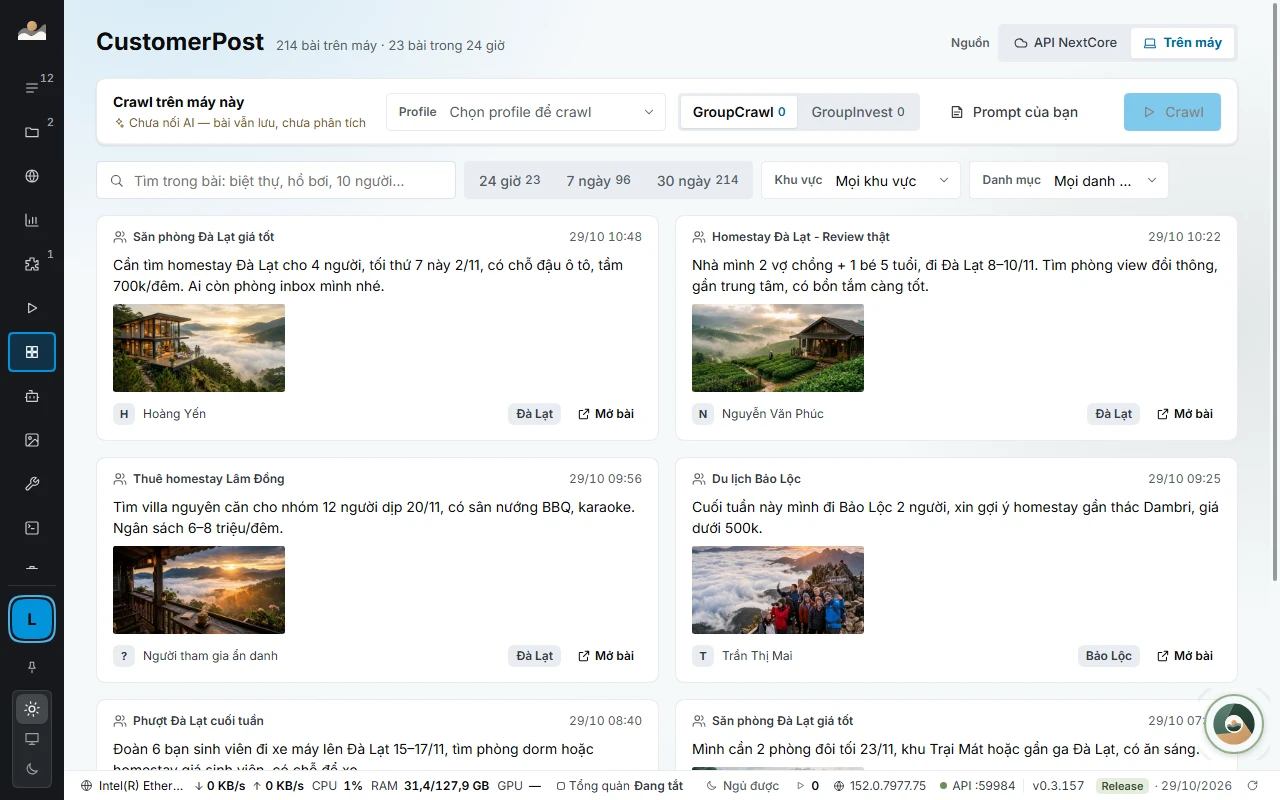
From a post card, you can open the original post on Facebook or queue a comment with Auto comment.
Common errors
- Tài khoản chưa được mở CustomerPost (CustomerPost is not enabled for this account): buy a plan that includes CustomerPost, then try again.
- Kho GROUP CRAWL chưa có group nào có ID số (The GROUP CRAWL store has no groups with a numeric ID): the groups in the store do not have a numeric ID yet, so they cannot be read. Find and save groups in NEXTCORE GROUPCRAWL first, or choose the GroupInvest list.
- Đang quét bài khách trên máy, chờ lượt này xong (Already scanning customer posts on this machine, wait for this run to finish): a crawl is already running. Wait for it to finish or ask the agent to stop it.
- Không mở được profile (Could not open the profile): open that profile by hand in PROFILE MANAGER to see the exact error.
- Không kết nối được máy chủ NextCore để nhận truy vấn đăng bài (Cannot connect to the NextCore server to get the posting query) or Máy chủ chưa cấp truy vấn đăng bài (HTTP …) (The server has not issued the posting query (HTTP …)): since version 0.3.156 the app gets the way to call Facebook from the NextCore server, tied to your account. Check the network, sign in to NextCore again if the app says the session expired, then run again.
- A crawl finishes with no customer posts: the groups had no room-seeking posts in the last 24 hours, or the AI key is failing. Check the key in NEXTCORE AGENT.
See also: NEXTCORE CUSTOMERPOST · NEXTCORE GROUPCRAWL.