
NextCore Browser Local API
Control profiles with scripts running on the same machine: create, open, get the CDP port, arrange windows, back up and restore.
What the Local API is
The Local API is a "control port" that NextCore Browser opens right on your machine. Instead of clicking in the app, a program (script) sends commands to this port to create profiles, open browsers, arrange windows… and the app does exactly what it would if you clicked.
- Only programs running on this same machine can call it (address
127.0.0.1); other machines on the network and the Internet cannot reach it. - Every command must include a token (like a password) taken from SETTINGS › AI agent (MCP) › Advanced.
- Web pages opened in a browser cannot call it (the app rejects every request with an
Originheader), so a malicious page cannot secretly control your profiles. - No command returns proxy passwords, 2FA keys, cookies or email passwords.
What it is for
| Task | Instead of | Call |
|---|---|---|
| Create 50 profiles from a list of proxies | clicking "Bulk create" and pasting by hand | POST / in a loop over a CSV file |
| Every morning, open the whole "Farm máy 1" group and arrange it on screen 2 | opening each profile and dragging each window | GET / → POST / → POST / |
| Automate pages (sign in, fill forms, read figures) in each profile | working by hand in each window | POST / returns wsEndpoint → connect Playwright / Puppeteer |
| Back up every profile each night | Back up… on each profile | POST / on a schedule (Task Scheduler / cron) |
| Connect to self-hosted n8n, Make, Zapier | — | an HTTP Request node calling 127.0.0.1 (n8n running on the same machine) |
| Let an AI agent (Claude, Cursor…) manage profiles in plain language | — | MCP, which runs on the Local API itself |
| Send groups found by GROUP CRAWL to your CRM / database | exporting CSV and importing by hand | Push GROUP CRAWL data: the app POSTs to your API or writes to MySQL / PostgreSQL |
Turning it on and getting the token
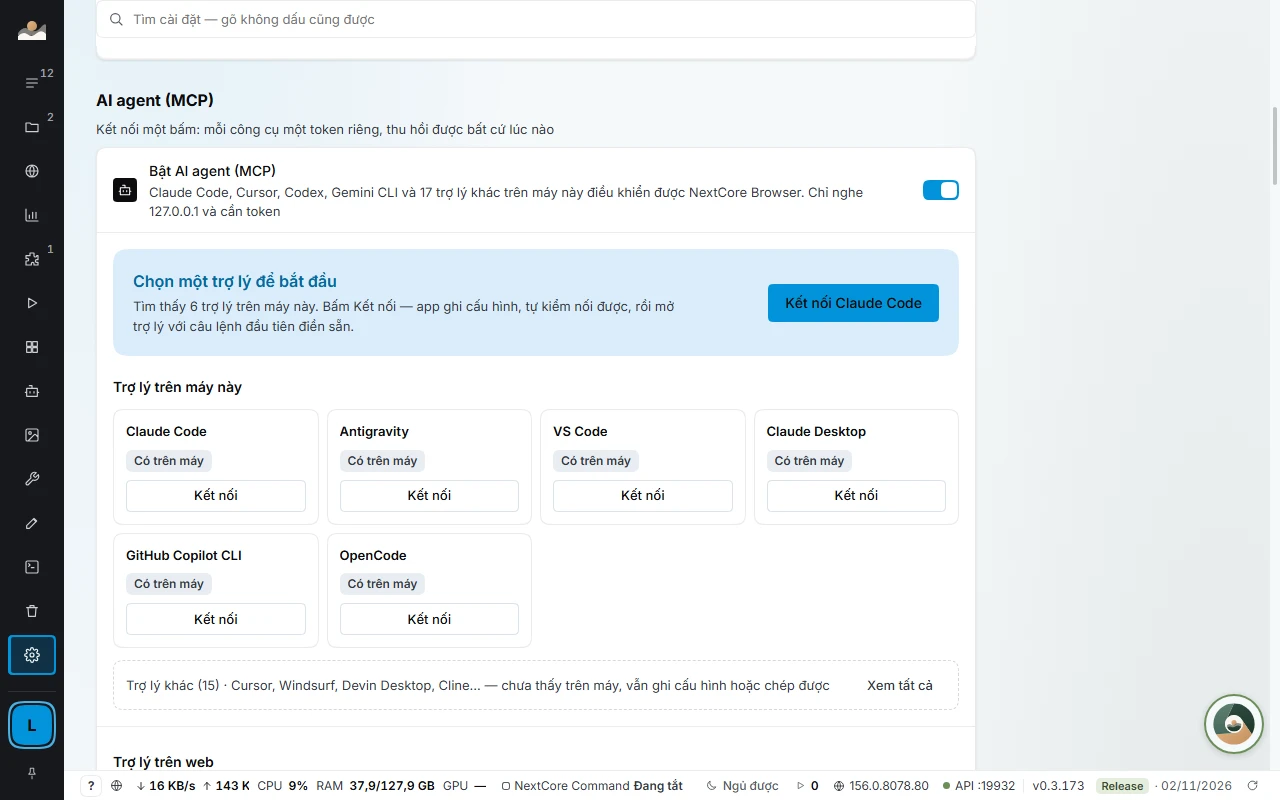
SETTINGS › AI agent (MCP), open Advanced at the bottom of the block: turn on Enable Local API, set the Port (default 19880), and click Show token to see the Token. The bottom right corner of the app footer shows API :
- Listens only on
127.0.0.1; other machines on the network cannot call it. - Every request must have
Authorization: Bearer <token>. - Requests with an
Originheader (calls from a web page) are rejected, which stops malicious web pages from controlling your profiles.
curl -H "Authorization: Bearer $NCB_TOKEN" http://127.0.0.1:19880/api/v1/statusMCP on the Local API: tool categories
Since 0.3.172, every MCP tool has a category (_meta.category). New installs only list the core groups (profiles, common page actions, E2E, Kernel), about 49 tools instead of 213, so agents use less context per session. Machines installed earlier keep every category as before.
- To add categories: use the machine setting
mcp.toolsets(agents change it throughncb_settings), or connect MCP with/(mcp?toolsets=a,b allmeans every category). - Calling a tool in a category that is turned off ⇒ error
NCB-1006, with the category name and how to turn it on in_meta. - Calls through the station to a sub-machine are not filtered by category.
Repo attribution (setting repoAttribution, off by default): when on, NextCore E2E results include a line for the agent to write to .ncb/ in your repo, and the commit trailer Verified-by: NextCore E2E (N trang, kiểm lại xanh) only when the run found no errors. When off, nothing is written to the repo.
Endpoints
This port also serves MCP at / for AI assistants; since 0.3.166 / returns English tool names and errors with NCB-xxxx codes, see MCP.
| Method | Path | Request body | Returns |
|---|---|---|---|
| GET | / |
app version, engine; since 0.3.169 also lastAbnormalExit (the last time the app closed abnormally + the NC-CRASH-… code) |
|
| GET | / |
list of profiles (without proxy passwords) | |
| POST | / |
{ name?, group?, proxy?, tags?, note?, startUrl?, extensionIds? } |
the new profile (empty name ⇒ NEXTCORE BROWSER NN). Since 0.3.19 engineId is ignored (always saved as null); every profile runs NextCore Chromium |
| GET | / |
one profile | |
| PATCH | / |
the fields to change | the profile |
| DELETE | / |
moves it to the trash | |
| POST | / |
{ scale? }: page zoom 0.25–5, default 1 (100%) |
{ pid, debugPort, wsEndpoint } |
| POST | / |
||
| GET | / |
the profiles currently open | |
| POST | / |
{ ids?, rows?, cols?, gap?, displayId?, scale? }: scale is saved as the zoom level for Arrange windows; it does not apply to / (since 0.3.20) |
{ arranged, failed } |
| GET | / |
NextCore Chromium on the machine (since 0.3.19 only builds the app downloads; empty engines = not downloaded yet, opening a profile downloads it automatically) |
|
| GET/POST | / |
POST: { path, isDefault? } |
extension library |
| POST | / |
exit IP, country, carrier and latency of the assigned proxy | |
| POST | / |
checks the profile for leaks: the IP pages see compared with the proxy, WebRTC, IPv6, DNS, time zone, language, QUIC; each item comes with how to fix it | |
| POST | / |
regenerates the profile's browser fingerprint | |
| POST | / |
{ url } · { maxKb } · { ref } · { ref, text, clear?, submit? } · { quality } |
page actions in an open profile (legacy; new scripts should connect Playwright through wsEndpoint) |
| GET | / |
the latest messages for the email recorded in the profile's note (NEXTCORE EMAIL) | |
| POST | / |
{ email?, matKhau? } (saves the email to the profile if sent) |
{ email, otpMoiNhat, soThu, kiemLuc } |
| POST | / |
{ email, matKhau, chiDinhHuong? } |
checks any mailbox; chiDinhHuong: true only discovers the mail server |
| GET/POST | / |
POST: { text, kiem?, nhom? } (one proxy per line) |
the proxy vault (without passwords or IP-rotation links) + shared-IP warnings |
| GET/PATCH/DELETE | / |
PATCH: { nhan?, ghiChu?, nhom?, proxy?, giaMoiGb?, giaThang? } · DELETE: ?goKhoiProfile=1 |
one proxy in the vault |
| POST | / · / |
checks / rotates the proxy's IP | |
| POST | / · / |
{ proxyId, profileIds } · { proxyIds, profileIds } |
assigns one proxy to many profiles / spreads many proxies evenly |
| GET/POST/PATCH/DELETE | / |
NEXTCORE MEDIA: account pool, projects, characters, locations, scenes, image/video generation. GET / returns the full state |
|
| POST | / |
{ password (≥ 8 characters), dest? } |
path to the .ncbak file |
| POST | / |
{ file, password, onConflict?: 'skip'|'replace'|'keepBoth' } |
restore result (default skip) |
proxy accepts exactly the same formats as the interface.
rows and cols must be given together; omit both ⇒ automatic grid. Profiles running Firefox return null for debugPort/wsEndpoint and cannot be arranged.
| Code | When |
|---|---|
| 401 | missing / wrong token |
| 403 | the request has an Origin header |
| 404 | no such profile |
| 409 | the profile is opening / closing; the proxy is assigned to a profile when deleting; the mailbox cannot be read |
| 423 | the app is waiting for sign-in: the port is listening but not returning data yet. Once you sign in to NextCore Browser, calls work again |
Controlling a profile with Playwright
import { chromium } from 'playwright'

const API = 'http://127.0.0.1:19880/api/v1'
const H = { Authorization: `Bearer ${process.env.NCB_TOKEN}`, 'Content-Type': 'application/json' }

const p = await (await fetch(`${API}/profiles`, { method: 'POST', headers: H, body: JSON.stringify({ group: 'Farm máy 1' }) })).json()
const run = await (await fetch(`${API}/profiles/${p.id}/start`, { method: 'POST', headers: H })).json()

const browser = await chromium.connectOverCDP(run.wsEndpoint)
const page = browser.contexts()[0].pages()[0] ?? (await browser.contexts()[0].newPage())
await page.goto('https://homestaynextcore.org')
console.log(await page.title())

await browser.close() // disconnects CDP, the profile stays open
await fetch(`${API}/profiles/${p.id}/stop`, { method: 'POST', headers: H })
Puppeteer: puppeteer.connect({ browserWSEndpoint: run.wsEndpoint }).
Note Scripts can only control profiles while the app is running and signed in. Keep the token like a password: anyone who has the token and can run code on your machine can control every profile.
Sample recipes
Python: create profiles from a proxies.txt file (one proxy per line), then open the first 5 and arrange them in a grid:
import os, requests

API = "http://127.0.0.1:19880/api/v1"
H = {"Authorization": f"Bearer {os.environ['NCB_TOKEN']}"}

ids = []
for i, line in enumerate(open("proxies.txt", encoding="utf-8").read().split()):
    p = requests.post(f"{API}/profiles", headers=H, json={"name": f"Shop {i+1:02}", "group": "Farm máy 1", "proxy": line}).json()
    ids.append(p["id"])

for pid in ids[:5]:
    run = requests.post(f"{API}/profiles/{pid}/start", headers=H).json()
    print(pid, run["wsEndpoint"])

requests.post(f"{API}/arrange", headers=H, json={"ids": ids[:5]})PowerShell: close every open profile (for the end of the day):
$H = @{ Authorization = "Bearer $env:NCB_TOKEN" }
$api = "http://127.0.0.1:19880/api/v1"
Invoke-RestMethod "$api/running" -Headers $H | ForEach-Object {
  Invoke-RestMethod "$api/profiles/$($_.profileId)/stop" -Method Post -Headers $H
}Node: back up a whole group to D:\sao-luu (schedule it to run every night):
const API = 'http://127.0.0.1:19880/api/v1'
const H = { Authorization: `Bearer ${process.env.NCB_TOKEN}`, 'Content-Type': 'application/json' }
const list = await (await fetch(`${API}/profiles?group=Farm%20m%C3%A1y%201`, { headers: H })).json()
for (const p of list) {
  const r = await fetch(`${API}/profiles/${p.id}/backup`, { method: 'POST', headers: H, body: JSON.stringify({ password: process.env.NCB_BACKUP_PASS, dest: 'D:\\sao-luu' }) })
  console.log(p.name, (await r.json()).file ?? 'lỗi')
}