
Move designs into NextCore Design
Bring existing designs from Penpot, claude.ai artifacts, HTML or SVG files into NEXTCORE DESIGN, swap hand-written colors for tokens, check light and dark, and score how close they stay to the original.
What it does
You already have interface designs somewhere else: a Penpot file, an artifact on claude.ai, an .html or .svg exported from a design tool.
This page shows how to bring them into NEXTCORE DESIGN (NCD), so agents can read and keep editing them through
the ncd_* MCP tools, while the NCD copy still matches the original and uses your own color tokens.
The original is left untouched and read-only. All edits happen in NCD.
When to use it
| Your design lives in | Bring it into NCD with |
|---|---|
| Penpot | Paste a Penpot share link or drop a .penpot file into NCD. Each file becomes a design, pages become folders, boards become screens |
| SVG / PNG exported from Penpot or Figma | Drag and drop into NCD, or have an agent call ncd_import on the folder |
Self-contained .html |
Drag and drop, or ncd_import. Google fonts load as they did when drawn |
| claude.ai artifact | Paste the artifact link into NCD, or have an agent read it and send each cell with ncd_import_html |
| Screenshot | Comes in as a reference image; the agent redraws it with ncd_draw (a picture has no structure to recolor) |
Quick start
Give an agent one sentence, for example in NEXTCORE TERMINAL:
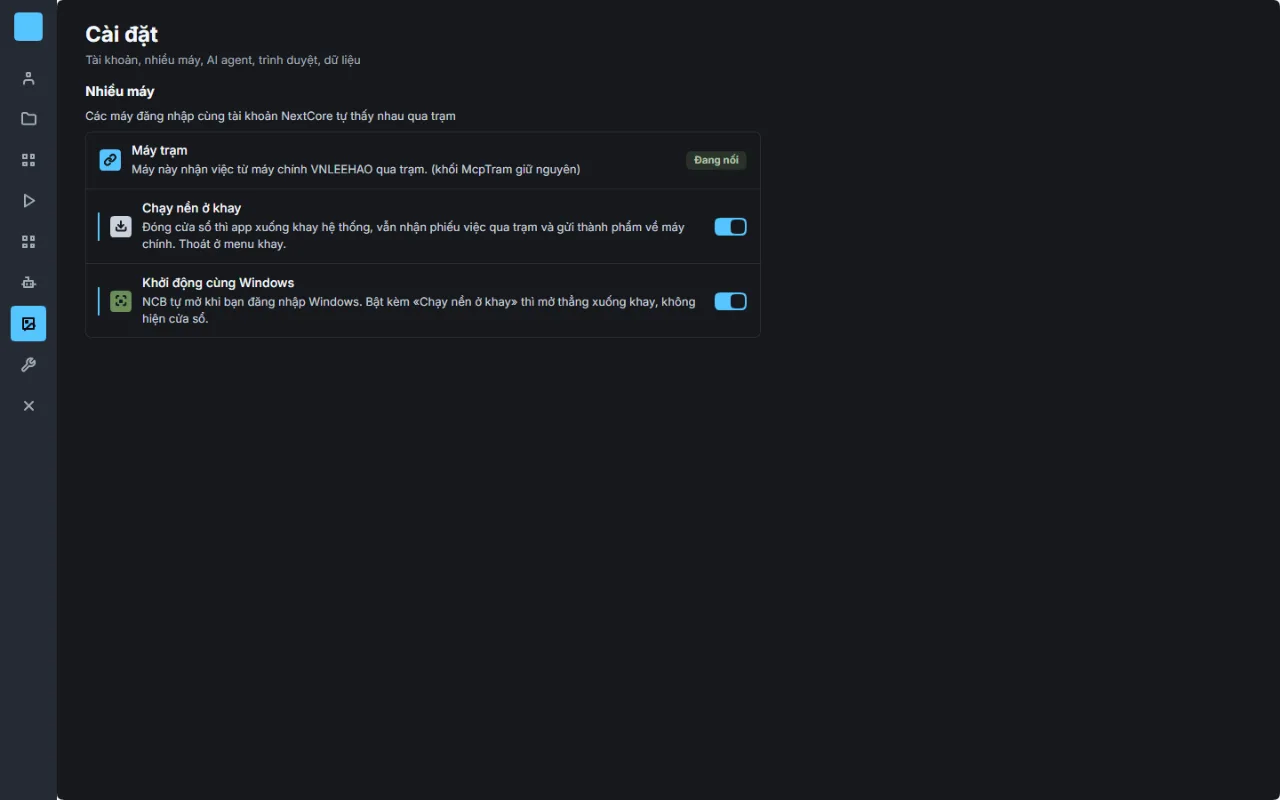
Move the «Settings › Start with Windows» designs into NEXTCORE DESIGN: check whether screens already exist, import if not,
replace hand-written colors with tokens, export light and dark, score SSIM against the original, send view links.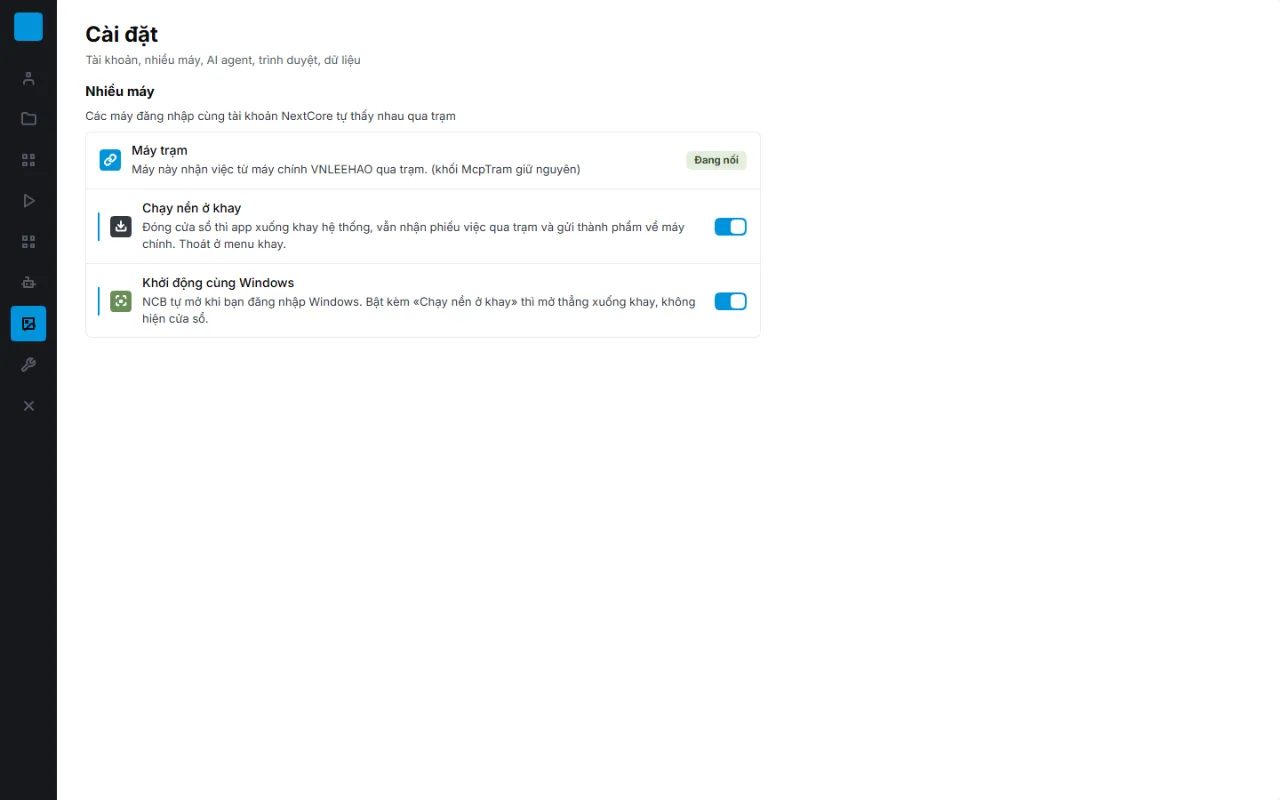
Steps
- Check what is already there. Open NCD and search by area name or issue number (agent:
ncd_tree). Penpot files imported by link are usually there already; importing again creates duplicate screens. - Import whatever is missing (table above). Each file gets its own progress line; for SVG and HTML, NCD scores similarity to the original (SSIM) per board.
- Take a «Before» version (agent:
ncd_version) so you have a before / after pair. - Check (agent:
ncd_check): hand-written colors, screen names, missing states. Replace hand-written colors with--ds-*tokens. - Export light and dark (agent:
ncd_export, adddark: true) and open the images. Text that disappears in dark mode usually means the board's root frame has no token background. - Score similarity against the original. 0.95 or higher passes.
- Create a view link for each screen and send it to whoever reviews.
Checking the result
| Check | Passes when |
|---|---|
| Similarity to the original (SSIM) | ≥ 0.95 per board |
| Colors | 0 hand-written values in ncd_check |
| Light and dark | Exports have no unreadable text and no horizontal overflow |
| Names | Folders «NN Name», screens «NN-01 Name» |
| View link | Opens without signing in |
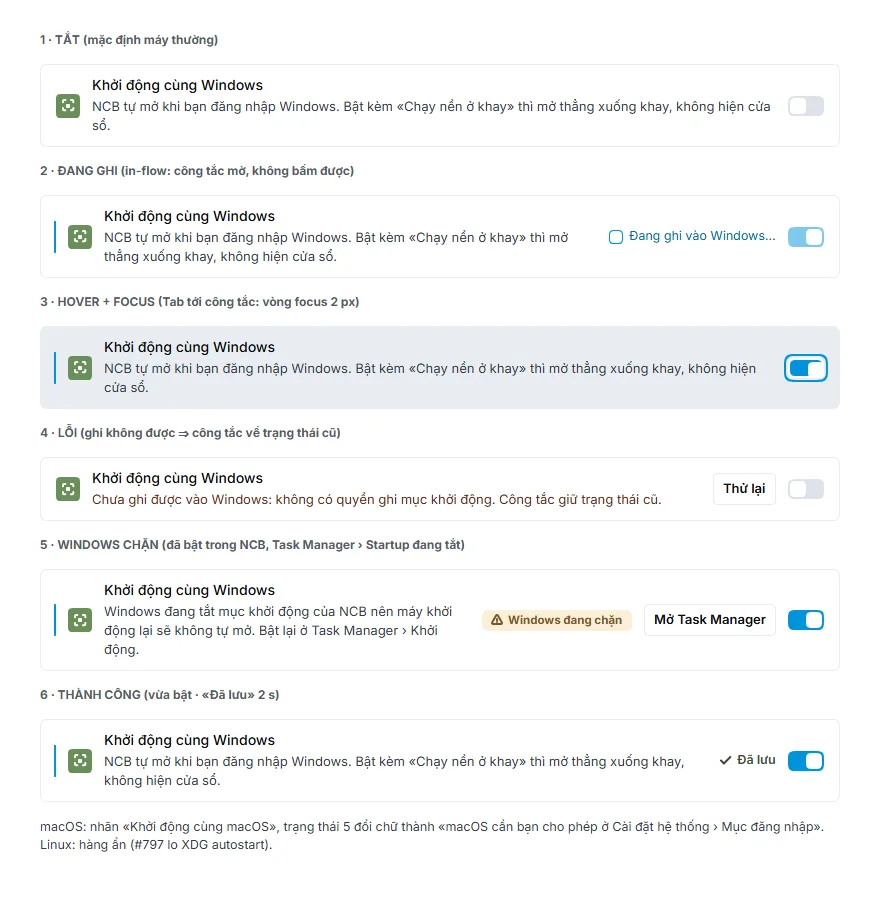
A real run: one area with 3 boards moved from Penpot scored SSIM 0.9881 · 0.9776 · 0.9874, with no hand-written colors left and readable in both light and dark.
Common problems
| What you see | Cause | Fix |
|---|---|---|
| Two identical screens after importing | The area was imported from a Penpot link, then the same SVGs were imported again | Keep the screens in the Penpot design, move the duplicates to the trash |
| Heavy black dividers, black text on a dark background | A color was matched to a token with the same value but the wrong role | Text uses --ds-ink, dividers and borders use --ds-hairline |
| Dark mode still has a white background | The board's root frame has no token background | Give the root frame --ds-surface |
| Focus ring around a control is gone | An outside-aligned Penpot stroke became an inside stroke | Add a separate ring frame outside the control |
| Unusually low SSIM, serif-looking text | The original SVG loads its fonts from a Penpot server that needs a sign-in | Score against an original whose font source is switched to Google Fonts |
| The agent says it edited, but the screen did not change | The edit was sent with the wrong field name | The agent re-reads the screen (ncd_read) after its first batch of edits |
Related
- NEXTCORE DESIGN (Vietnamese): import, folders, export and view links.
- NEXTCORE TERMINAL (Vietnamese): assign work to agents.