
Auto warm-up
Keep Facebook accounts active like a real person with sessions that read the news feed, browse groups and watch reels, on a schedule and with daily caps. Read only, never posts anything.
A Facebook account left unused for a long time that suddenly posts in bulk is likely to be checked. Auto warm-up opens each account in sessions, reads the news feed, browses groups, watches reels and reads notifications like a real person, then closes it, repeating several times a day. Warm-up only reads: it never writes comments, shares, follows, or joins or leaves groups.
The feature is for seller accounts or the VIP plan, and runs on NextCore Chromium profiles.
Since 0.3.166 this screen has an English version: SETTINGS › Appearance and screen privacy › Language › English.
Where to open it
Sidebar › NEXTCORE AUTOMATIONS › the Auto warm-up row › Open. The screen has two tabs: Chiến dịch (Campaigns) and Today's sessions.
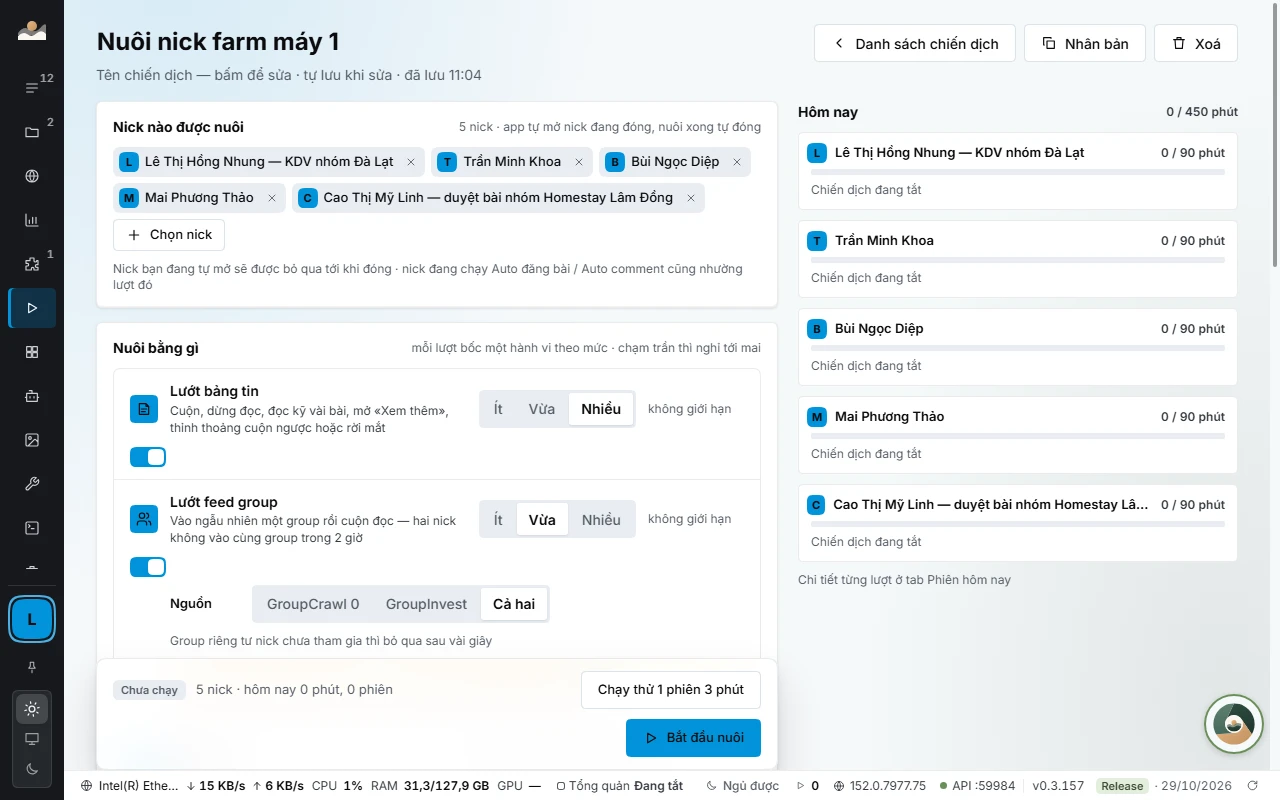
Create a campaign
- Click New campaign (or Create first campaign). Click the name at the top of the screen to rename it, for example «Nick khu Hồ Tuyền Lâm».
- Accounts to warm up: click Select accounts to warm up and tick the profiles. The app opens closed accounts itself and closes them when the warm-up is done.
- How to warm up: turn on behaviors and choose a level of Low · Medium · High for each one. In each session the app picks one behavior according to the levels.
- How it runs: see the table below.
- Click Test run 1 session of 3 min to watch an account do a test run, then Start warm-up.
The campaign saves itself as you edit. The top of the screen has Campaign list, Duplicate (the copy starts off) and Delete. Deleting a campaign stops every running session; the session history is kept.
Behaviors
| Behavior | What it does | Cap per account per day |
|---|---|---|
| Browse news feed | Scrolls, pauses to read, reads a few posts closely, opens «See more», occasionally scrolls back up | no limit |
| Browse group feed | Goes into a random group and scrolls through it. Two accounts never enter the same group within 2 hours | no limit |
| Xem reel (Watch reels) | Watches 10 to 40 videos in a row each time | at most 6 times |
| Read notifications | Opens the Notifications page and scrolls through it, never clicks «Mark as read» | at most 5 times |
| Open Messenger | Looks at the chat list without opening any chat, so no «seen» is left | at most 4 times |
| Add group members as friends | Sends friend requests to people who just joined the group or are nearby, never to admins, with at least 20 minutes between two requests | at most 3 requests |
A new campaign has the first four behaviors on (news feed at High, group feed and reels at Medium, notifications at Low); Open Messenger and Add group members as friends start off.
Browse group feed also has a Source box: GroupCrawl, GroupInvest or Both. A private group the account has not joined is skipped after a few seconds.
Two switches:
- Like while reading: very sparse, about 1 post in every 100 read, at most 3 times per account per day, with at least 45 seconds between two likes.
- Like comments: occasionally opens the comments on a post, reads for a few seconds and likes one comment, at most 2 times per account per day.
How it runs
| Row | Meaning | Default |
|---|---|---|
| Session length | Picked at random within 2 to 60 minutes | 8 to 20 minutes |
| Rest between two sessions of an account | 5 to 360 minutes. The account is closed during the rest | 40 to 120 minutes |
| Max per account per day | Minutes (5 to 600), sessions (1 to 30), MB through the proxy (0 means no limit). Reaching any one of the three means resting until tomorrow | 90 minutes, 6 sessions |
| Warm-up hours | All day, or Within hours. The window can cross midnight, for example 22:00 to 06:00 | 07:00 to 23:00 |
| Run in parallel | The number of accounts open at once shares the same cap with Auto post; change it in Auto post › How it runs | |
| Stop account when Facebook asks for verification | Always on. On a checkpoint, a sign-out or a verification dialog, that account stops |
Note: For accounts on a proxy billed per GB, set a daily MB cap. The Lưu lượng proxy screen shows how much of the traffic warm-up is using.
Monitoring
The Hôm nay (Today) column on the right of the campaign screen shows one bar per account, minutes warmed up against the cap, with a status:
- Warming up: the behavior in progress, «7 min left in session». A Stop session button.
- Resting: the time of the next session.
- Queued: waiting for a slot within the parallel cap.
- Daily cap reached · resting until tomorrow, Outside warm-up hours.
- Skipped: an account you have open yourself, or one running Auto post or Auto comment. That account is warmed up again when it is free.
- Stopped: Facebook asked for verification (see below).
In the campaign list, the «Đang nuôi lúc này» (Warming up now) block has a Stop all button that stops every session and closes the accounts. The switch on each campaign turns that campaign on or off.
The Today's sessions tab lists each session: start time, end time, minutes, a summary of behaviors and the result (Xong (Done), Đã dừng (Stopped), Bị dừng (Stopped by verification), Lỗi (Error)). Filter by account or by result. The app keeps the 600 most recent sessions on the machine.
When Facebook asks for verification
When an account hits a checkpoint, gets signed out or sees a verification dialog, the app stops that account immediately and does not open it again. The account's row shows the reason and the time.
- Click Open account to fix, then verify or sign in again yourself.
- Only after that, click Resume warm-up › Resume warm-up.
Note: Warming up an account that is still under review can get it locked for good. Only resume once you have dealt with it.
Common errors
- GroupCrawl store is empty: the group feed behavior with the GroupCrawl source has no groups. Find groups in NEXTCORE GROUPCRAWL first, or switch the source to GroupInvest.
- GroupInvest failed to load: the Both source uses only GroupCrawl for now; with the GroupInvest source this behavior is skipped for now. Click Retry.
- No sessions today yet: the warm-up hours have not started yet, or the parallel cap is full.
- An account is not being warmed up: check whether the account is open by hand or running Auto post, and whether the profile uses Firefox.
See also: NEXTCORE AUTOMATIONS · Auto post.